This morning was wasted by my hare-brained last minute initiative to get an audiobook to listen to during my trip to Fencon. Not long ago I bought an iVO Sound MP3 player. No, I haven't heard of this brand either. As it turned out, this proved to be the problem.
I bought an download of an audio recording of Robert Charles Wilson's "Axis" from Audible.com. When you buy a recording from them, it does not come in a clean, neat MP3 file. No, you have to install an Audible Manager software on your computer. Then you use the manager to transfer the recording, which is in a proprietary format, to your MP3 player. Before you begin that process, the Audible Manager asks what kind of MP3 player you have. Lo and behold -- in the list of 20-30 players, there was no iVO Sound! So I called their customer service. After putting me on hold, the guy determined this player was not compatible with Audible format, because it lacks some kind of universal plugin.
I asked him for a refund. (Those audiobooks are not that cheap.) The customer service guy tried to remind me that I have other ways to listen to audiobooks, such as on my computer. I told him I bought this recording specifically for listening on a trip, so playing it on a computer is not an option. After putting me on hold (probably to confer with a manager) he said they'll issue me a refund. It should show up in my account in 24 hours. We'll see if it does or not.
What a waste of time. It all could have been avoided if Audible.com listed the MP3 players they support on their website! How hard can that be?
When I come back from Dallas, I may actually return the iVO Sound to the store and buy a more common brand of MP3 player. The iVO is decent, but not the easiest player to operate. Its user interface is kind of screwy.
Bookmark This on Delicious
Showing posts with label wifi. Show all posts
Showing posts with label wifi. Show all posts
Thursday, October 02, 2008


Monday, February 11, 2008
New reasons not to use XO!
It may be hard to believe that my XO experience could become even worse, but it did. I must admit that as much as I curse it, I still use it. I don't have much choise: my de-trackpad'ed Fujitsu laptop is no longer mobile, because using an external mouse means having to find a flat surface to move it around on, and that's often infeasible when I'm out and about. So I'm still using XO as my mobile computing device.
But lately the XO laptop has given me two new reasons not to use it. In fact, it has declared it won't tolerate my presence any more.
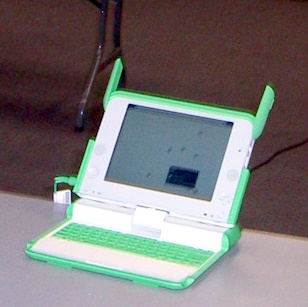
An XO / OLPC laptop.1. One (if not more) of its keys is sticking. It is, unfortunately, one of the "key" keys, heh heh. I don't even know precisely which one it is, but I think it's Ctrl, or Alt, or some such key that modifies the behavior of other keys. It malfunctioned in the worst possible way: it's acting as if it is always pressed. So when I press any other key, the computer reacts as if I issued a special command, and does something unpredictable. And no, I did not spill anything on the keyboard. The funny thing is that it does not stick all the time. When I boot the lappy, all the keys work fine for a short while, and then out of the blue the problem starts. So the laptop has become practically unusable.
But that's not all.
So far the biggest perk I got out of my XO ownership was not the computer itself, but a free subscription to T-Mobile wireless access. T-Mobile rewarded "Give 1, get 1" customers with a year of free access to its hotspots. It's been a good deal so far because all Starbucks are T-Mobile hotspots, and there is a Starbucks on every corner, so my WiFi-enabled pasture has become much bigger. And I can use the subscription with any wireless device, not just with XO. So far so good.
Guess what I've read in the news yesterday?
Starbucks to Offer Free Wi-Fi With AT&T
Starbucks Corp. and AT&T Inc. will start offering a mix of free and paid wireless Internet service in most of the global coffee retailer's U.S. shops, beginning this spring.
The move announced Monday ends a six-year Starbucks partnership with T-Mobile, which did not include free Wi-Fi and charged higher fees than AT&T will.
So my T-Mobile access is about to become worthless. I don't know of any of their hotspots outside of Starbucks (well, there is one at a Borders' bookstore, but I haven't been able to connect to it). Oh well, it's seriously time to look for a computer museum to donate my XO to (since I now believe that these laptops, far from taking the world by storm, will become, to quote a friend, "tech curios".)
It's high time for me to buy a new "real" laptop. I have a few ultra-portable candidates in mind, but I haven't seen them in stores, and I am squeamish about buying a laptop on the internet sight unseen.
By the way, the Starbucks news is not all bad:
Starbucks said it will give customers who use a Starbucks purchase card two hours of free wireless access per day.
So if I limit my Starbucks visits to 2 hours (and I rarely have the time for a longer stay), I should still be able to enjoy free WiFi. But definitely on a different laptop.
Thursday, February 22, 2007
From an email address trap to social software
Since my company takes President's day off, I spent a couple of hours on Monday at 360 Primo. It's a good place to write: not only it is a very cool coffeeshop, it has flaky WiFi as a bonus. :-) Flaky WiFi, while annoying, is just what you need while writing. It keeps you from temptation of surfing the web. Fewer distractions.
But a mind, determined to find distraction, will find it. And so, unable to access the internet, I started to explore the only thing I could connect to: Less Networks site. Less Networks is the WiFi provider for 360 Primo and a number of other wireless hotspots around Austin (and elsewhere, apparently). For some reason, while every other page on the internet was loading very slowly, Less Networks site was speedy and responsive.
Less Networks WiFi differs from other WiFi spots in Austin in that you need to sign in to use their network. Meaning, you need to create an account, and for that you need to give out your email address. When I first came across one of their hotspots at (some other) Austin coffeeshop a couple of years ago, I thought, great! Yet another company found a novel excuse for harvesting email addresses! There was an article in the local newspaper about Less Networks, where they said this feature was for user convenience: it will allow Less Networks users to access all of Less Networks hotspots with the same username. I could not believe what a lame excuse it was: after all, everybody knows that you don't need an account to access a wireless network! Your computer can connect to any wireless network (that does not use encryption) without you having to give out any of your personal information! :-) Did this company think WiFi users were complete idiots?
Then a couple years later I read another article about Less Networks, where this misfeature was spun as a security feature. Supposedly, if users are required to log in, that will prevent them from doing evil things on the internet, because Less Networks will know who they are. I found this explanation to be insincere as well. Your account is tied to nothing but your email address, and that's not a solid piece of identity, given how easy it is to get a disposable email address.
But on Monday I explored their site further to see what all "benefits" I might get from my account at Less Networks, and I was surprised to discover that they have branched out into social software. (Or maybe they've been there all along, and I just didn't know it. :-)) It turns out you can see the profiles of other Less Networks users in the same coffeeshop (but only if you choose to make your own profile visible, so no one can see you against your will). And not only you can customize your profile with your picture, you can also indicate your relationship status. Available options are "seeking men", "seeking women", and "not looking".
Seeing that, I thought: dammit, I had a similar idea in 2002!.. even as I realized I was probably one of thousands of people who had the same idea. :-) Marrying wireless network software with dating software sounds like a match made in heaven. :-) Indeed, many people who hang out in cofeeshops with their laptops for hours on end are single. And many of them may see a cute or interesting person in the coffeeshop, but rarely approach them, as that would feel rather awkward (try to chat up a stranger in a quiet place like a coffeeshop, and you'll feel as exposed as an actor on stage). Wouldn't it be better to silently send an instant message to that cute person, to gauge their interest? This idea had occurred to me back in 2002; I thought it would be cool if WiFi-enabled coffeeshops ran software that would enable people in the coffeeshop to connect. But of course, I'm one of the 99% of the population that dreams up all sorts of ideas but would never even think of putting them into practice (there's no market for something like that... who would ever want such a thing?.. people can barely do x on their computers, you can't expect them to do y... if there was money to be made of off something so simple, someone would have done it already). Not to mention that my personal circumstances back in 2002 were very inconducive to entrepreneurship. And wireless networks in Austin were still nascent -- you were lucky if you could get a good signal at a WiFi coffeeshop. Anything more was a pipe dream. And then soon my single days ended, so I lost interest in the subject. :-)
And now I see Less Networks is going somewhere with this idea. Though I don't think they provide a way for users to instant-message other users, which is a feature I would think as most useful for people trying to connect with others in the same coffeeshop. But I shall not bemoan their running away with "my" idea, because I'm pretty sure 10000 other people in the US had the same idea at the time, and no one lifted a finger to do something about it. As the saying goes, many hear the call but few are chosen. :-)
But a mind, determined to find distraction, will find it. And so, unable to access the internet, I started to explore the only thing I could connect to: Less Networks site. Less Networks is the WiFi provider for 360 Primo and a number of other wireless hotspots around Austin (and elsewhere, apparently). For some reason, while every other page on the internet was loading very slowly, Less Networks site was speedy and responsive.
Lame excuses: why would you need an account to access a wireless network?
Less Networks WiFi differs from other WiFi spots in Austin in that you need to sign in to use their network. Meaning, you need to create an account, and for that you need to give out your email address. When I first came across one of their hotspots at (some other) Austin coffeeshop a couple of years ago, I thought, great! Yet another company found a novel excuse for harvesting email addresses! There was an article in the local newspaper about Less Networks, where they said this feature was for user convenience: it will allow Less Networks users to access all of Less Networks hotspots with the same username. I could not believe what a lame excuse it was: after all, everybody knows that you don't need an account to access a wireless network! Your computer can connect to any wireless network (that does not use encryption) without you having to give out any of your personal information! :-) Did this company think WiFi users were complete idiots?
Then a couple years later I read another article about Less Networks, where this misfeature was spun as a security feature. Supposedly, if users are required to log in, that will prevent them from doing evil things on the internet, because Less Networks will know who they are. I found this explanation to be insincere as well. Your account is tied to nothing but your email address, and that's not a solid piece of identity, given how easy it is to get a disposable email address.
But on Monday I explored their site further to see what all "benefits" I might get from my account at Less Networks, and I was surprised to discover that they have branched out into social software. (Or maybe they've been there all along, and I just didn't know it. :-)) It turns out you can see the profiles of other Less Networks users in the same coffeeshop (but only if you choose to make your own profile visible, so no one can see you against your will). And not only you can customize your profile with your picture, you can also indicate your relationship status. Available options are "seeking men", "seeking women", and "not looking".
A marriage of wireless networks and dating software
Seeing that, I thought: dammit, I had a similar idea in 2002!.. even as I realized I was probably one of thousands of people who had the same idea. :-) Marrying wireless network software with dating software sounds like a match made in heaven. :-) Indeed, many people who hang out in cofeeshops with their laptops for hours on end are single. And many of them may see a cute or interesting person in the coffeeshop, but rarely approach them, as that would feel rather awkward (try to chat up a stranger in a quiet place like a coffeeshop, and you'll feel as exposed as an actor on stage). Wouldn't it be better to silently send an instant message to that cute person, to gauge their interest? This idea had occurred to me back in 2002; I thought it would be cool if WiFi-enabled coffeeshops ran software that would enable people in the coffeeshop to connect. But of course, I'm one of the 99% of the population that dreams up all sorts of ideas but would never even think of putting them into practice (there's no market for something like that... who would ever want such a thing?.. people can barely do x on their computers, you can't expect them to do y... if there was money to be made of off something so simple, someone would have done it already). Not to mention that my personal circumstances back in 2002 were very inconducive to entrepreneurship. And wireless networks in Austin were still nascent -- you were lucky if you could get a good signal at a WiFi coffeeshop. Anything more was a pipe dream. And then soon my single days ended, so I lost interest in the subject. :-)
And now I see Less Networks is going somewhere with this idea. Though I don't think they provide a way for users to instant-message other users, which is a feature I would think as most useful for people trying to connect with others in the same coffeeshop. But I shall not bemoan their running away with "my" idea, because I'm pretty sure 10000 other people in the US had the same idea at the time, and no one lifted a finger to do something about it. As the saying goes, many hear the call but few are chosen. :-)
Friday, February 02, 2007
Internet phone companies: good for managing your wireless router, if nothing else
A week after we moved into our new house, the internet service at the house disappeared. The wireless router still worked. The signal was strong as ever. But none of the machines could get on the internet.
Plugging a laptop directly into the cable modem (we have Roadrunner) verified that the the wireless access point wasn't the point of failure. Steve's laptop, plugged in directly into the cable modem (bypassing the wireless access point), was unable to get an IP address. So the problem was lack of service from Roadrunner. Steve's call to Roadrunner's tech support revealed that Roadrunner messed up switching our account from the old apartment to the new house. Interestingly, this happened a week after the move. At the beginning, they turned on the service at the house on the day of the move, and it worked with no problems. Then a week later they decided to finally cut the service off at the old apartment, and accidentally disabled both. Well, anyway: a short phone call later Roadrunner got it fixed. Their tech support had Steve plug his laptop into the cable modem again, and verified that the laptop was getting an IP address and was able to access the internet. So Roadrunner considered its end of the problem solved.
But the story didn't end there. As we found out a few minutes after Steve hung up with Roadrunner, for all intents and purposes we still didn't have internet access. Despite the cable modem now working, the wireless router wasn't getting an IP address. Various rebootings and resettings didn't help. And we could not call Roadrunner back and ask for more help. Here's why. As I understand it, the type of service we signed up for with Roadrunner has a funny loophole. The contract does not allow more than one computer to use Roadrunner. If we wanted to use multiple computers, we would have to sign up for a more expensive type of service. And if you have a wireless access point at home, it's obvious that you are connecting multiple computers to it. Though in theory, even if you had only one computer, you might still want to have WiFi, so that you could to carry the computer around the house. So I guess Roadrunner can't automatically claim you are violating the contract if you have a wireless router... but still. So there is what I would describe as an uneasy truce between one-computer subscribers and Roadrunner. Roadrunner ignores it if a one-computer subscriber has a wireless router, but they tell you they won't help you administrate your router. That's your responsibility.
Who to call, then, if your router still doesn't work after Roadrunner fixed the problem? (And, I repeat, the wireless part was working well: it was emitting a signal. It's just that it wasn't getting an IP address from Roadrunner. So it definitely had something to do with what RR did on their end -- it would have been too much coincidence if the router just started malfunctioning at the same time.) I suppose we could have called Linksys (the manufacturer of the router). But Steve had a better idea...
...let's call Vonage. For you see, we subscribe to an internet phone service from Vonage.
Actually, we don't use it. There's no logic in that. Steve got Vonage because it provides very cheap long distance phone calls. The problem is, neither of us makes long distance phone calls very often. It's not like we have no one to call: Steve's and my families live correspondingly halfway across the US and halfway across the world. And the result? Steve talks with his mom on his cell phone; whereas I, since my emigration 12 years ago, have talked with my family on the phone exactly twice. :-) Not because I am an ungrateful daughter and sibling (though I might be :-)) but because spoken word is soooo not my medium. I am a written word person. I like a medium where I can edit myself and present the other party with complete thoughts, instead of half-finished phrases. I like a medium that does not require me to rack my brain trying to come up with filling for "uncomfortable" pauses. So, long distance phone service to me is like a proverbial bicycle for a fish. :-) And there is a significant downside of having a phone service that uses your internet connection: when the internet is down, your phone is down. OTOH, a conventional land line would stay up when the internet is down. So if one needs a land line of any kind (which I don't -- a cell phone is enough for me), a conventional land line makes a lot more sense than an IP phone. So frankly, I don't know why Steve wants to keep Vonage service.
There is just one little detail about Vonage service that may raise the hackles of anyone who is paranoid about privacy; I on the other hand, believing my files may only hold interest as a fast remedy for insomnia, don't mind surrendering a little privacy for convenience. :-) When you subscribe to Vonage, Vonage "locks" your wireless router so that its tech support could administrate it. By "locking" the router I mean that Vonage has the password to the administrator's account. They still let you administrate it yourself (at least partially) by creating a different account for you. Regardless, you don't have a complete control over your router.
I'm not clear on details of this. Steve said that he bought our wireless router already pre-locked for Vonage! I don't know if all Linksys routers sold in the US are that way (doesn't seem likely to me) or if this one was one of a batch of pre-locked routers sold as part of a deal between Linksys and Vonage, where you could get a Vonage subscription cheap by buying a Linksys router.
But when you are racking your brain over what's wrong with your router, it's handy to be able to call Vonage and say "your phone service isn't working" (omitting that we really just want to get on the internet, not to use their IP phone) and get them to fix it. And fix it they did -- they had to. The problem turned out to be interesting. To me, at least. Not technically, but politically.
The answer, suggested by Vonage tech support, was to change the MAC address of our wireless router to be the same as that of Steve's laptop. (I didn't know MAC addresses were changeable, but apparently they are.) Why? Because when Steve made his previous phone call to Roadrunner and had them fix the problem on their side, Roadrunner made it so that only Steve's laptop would be able to connect to their service. Remember, Steve had his laptop plugged into the cable modem during the phone call for the purposes of testing. Roadrunner recognizes his laptop by its MAC address.
So, in order to make the wireless router to connect to Roadrunner, the router now had to be given the same MAC address as Steve's laptop. Once Steve did that, it started to work.
Of course, Roadrunner didn't tell Steve that they will limit our service to this particular MAC address. Steve had no way of knowing that. If not for Vonage, we would not have found out. And I don't know how Vonage's tech support knows those things: maybe from experience? Maybe they have to deal every day with customers whose service stopped working after they moved to a new house?
So the whole situation looks pretty weird to me. Roadrunner messes with your settings and they won't tell you what they changed. And you can't call them to find out, because hey -- they've done their job, and any problems you may have afterwards are your router problems, not Roadrunner's. Even though RR effectively disabled your router by keeping a key piece of information from you.
I don't know, maybe I misunderstood something, maybe there's more to this story. Steve wasn't most forthcoming with the details. He was in a grumbly mood after those two phone calls, and I don't blame him. Running a tech support gauntlet does that to you. So I didn't press him for details.
At first it looked like a screw-up on Roadrunner's part, which was easily fixed
Plugging a laptop directly into the cable modem (we have Roadrunner) verified that the the wireless access point wasn't the point of failure. Steve's laptop, plugged in directly into the cable modem (bypassing the wireless access point), was unable to get an IP address. So the problem was lack of service from Roadrunner. Steve's call to Roadrunner's tech support revealed that Roadrunner messed up switching our account from the old apartment to the new house. Interestingly, this happened a week after the move. At the beginning, they turned on the service at the house on the day of the move, and it worked with no problems. Then a week later they decided to finally cut the service off at the old apartment, and accidentally disabled both. Well, anyway: a short phone call later Roadrunner got it fixed. Their tech support had Steve plug his laptop into the cable modem again, and verified that the laptop was getting an IP address and was able to access the internet. So Roadrunner considered its end of the problem solved.
But the story didn't end here
But the story didn't end there. As we found out a few minutes after Steve hung up with Roadrunner, for all intents and purposes we still didn't have internet access. Despite the cable modem now working, the wireless router wasn't getting an IP address. Various rebootings and resettings didn't help. And we could not call Roadrunner back and ask for more help. Here's why. As I understand it, the type of service we signed up for with Roadrunner has a funny loophole. The contract does not allow more than one computer to use Roadrunner. If we wanted to use multiple computers, we would have to sign up for a more expensive type of service. And if you have a wireless access point at home, it's obvious that you are connecting multiple computers to it. Though in theory, even if you had only one computer, you might still want to have WiFi, so that you could to carry the computer around the house. So I guess Roadrunner can't automatically claim you are violating the contract if you have a wireless router... but still. So there is what I would describe as an uneasy truce between one-computer subscribers and Roadrunner. Roadrunner ignores it if a one-computer subscriber has a wireless router, but they tell you they won't help you administrate your router. That's your responsibility.
Who to call, then, if your router still doesn't work after Roadrunner fixed the problem? (And, I repeat, the wireless part was working well: it was emitting a signal. It's just that it wasn't getting an IP address from Roadrunner. So it definitely had something to do with what RR did on their end -- it would have been too much coincidence if the router just started malfunctioning at the same time.) I suppose we could have called Linksys (the manufacturer of the router). But Steve had a better idea...
Next step: call Vonage
...let's call Vonage. For you see, we subscribe to an internet phone service from Vonage.
Actually, we don't use it. There's no logic in that. Steve got Vonage because it provides very cheap long distance phone calls. The problem is, neither of us makes long distance phone calls very often. It's not like we have no one to call: Steve's and my families live correspondingly halfway across the US and halfway across the world. And the result? Steve talks with his mom on his cell phone; whereas I, since my emigration 12 years ago, have talked with my family on the phone exactly twice. :-) Not because I am an ungrateful daughter and sibling (though I might be :-)) but because spoken word is soooo not my medium. I am a written word person. I like a medium where I can edit myself and present the other party with complete thoughts, instead of half-finished phrases. I like a medium that does not require me to rack my brain trying to come up with filling for "uncomfortable" pauses. So, long distance phone service to me is like a proverbial bicycle for a fish. :-) And there is a significant downside of having a phone service that uses your internet connection: when the internet is down, your phone is down. OTOH, a conventional land line would stay up when the internet is down. So if one needs a land line of any kind (which I don't -- a cell phone is enough for me), a conventional land line makes a lot more sense than an IP phone. So frankly, I don't know why Steve wants to keep Vonage service.
If you are paranoid about privacy, Vonage may not be for you
There is just one little detail about Vonage service that may raise the hackles of anyone who is paranoid about privacy; I on the other hand, believing my files may only hold interest as a fast remedy for insomnia, don't mind surrendering a little privacy for convenience. :-) When you subscribe to Vonage, Vonage "locks" your wireless router so that its tech support could administrate it. By "locking" the router I mean that Vonage has the password to the administrator's account. They still let you administrate it yourself (at least partially) by creating a different account for you. Regardless, you don't have a complete control over your router.
I'm not clear on details of this. Steve said that he bought our wireless router already pre-locked for Vonage! I don't know if all Linksys routers sold in the US are that way (doesn't seem likely to me) or if this one was one of a batch of pre-locked routers sold as part of a deal between Linksys and Vonage, where you could get a Vonage subscription cheap by buying a Linksys router.
How did Vonage tech support fix our router problem?
But when you are racking your brain over what's wrong with your router, it's handy to be able to call Vonage and say "your phone service isn't working" (omitting that we really just want to get on the internet, not to use their IP phone) and get them to fix it. And fix it they did -- they had to. The problem turned out to be interesting. To me, at least. Not technically, but politically.
The answer, suggested by Vonage tech support, was to change the MAC address of our wireless router to be the same as that of Steve's laptop. (I didn't know MAC addresses were changeable, but apparently they are.) Why? Because when Steve made his previous phone call to Roadrunner and had them fix the problem on their side, Roadrunner made it so that only Steve's laptop would be able to connect to their service. Remember, Steve had his laptop plugged into the cable modem during the phone call for the purposes of testing. Roadrunner recognizes his laptop by its MAC address.
So, in order to make the wireless router to connect to Roadrunner, the router now had to be given the same MAC address as Steve's laptop. Once Steve did that, it started to work.
Because they knew a secret Roadrunner kept from us
Of course, Roadrunner didn't tell Steve that they will limit our service to this particular MAC address. Steve had no way of knowing that. If not for Vonage, we would not have found out. And I don't know how Vonage's tech support knows those things: maybe from experience? Maybe they have to deal every day with customers whose service stopped working after they moved to a new house?
So the whole situation looks pretty weird to me. Roadrunner messes with your settings and they won't tell you what they changed. And you can't call them to find out, because hey -- they've done their job, and any problems you may have afterwards are your router problems, not Roadrunner's. Even though RR effectively disabled your router by keeping a key piece of information from you.
I don't know, maybe I misunderstood something, maybe there's more to this story. Steve wasn't most forthcoming with the details. He was in a grumbly mood after those two phone calls, and I don't blame him. Running a tech support gauntlet does that to you. So I didn't press him for details.
Subscribe to:
Posts (Atom)

 Posts


