Showing posts with label computers. Show all posts

Friday, February 28, 2014

"Computer Chess" movie: come for the 80s tech nostalgia, stay for the weirdness

The movie "Computer Chess" passed largely unnoticed in the big theaters (it didn't even play in Austin), but I greatly enjoyed this mockumentary about a computer chess tournament in the early 1980s. At first I didn't think that it would have much value beyond nostalgic or historical. A nostalgia trip for those who were computer nerds in the eighties, I thought it might be educational for someone like me, who never saw a PC up close until the early 90s. It must have been harder to be passionate about computing in the days when computers didn't fit in your pocket; the really devoted computer scientists, such as the ones portrayed in this movie, put their machines on dollies and wheeled them from room to room when they wanted to play them against one another.

But what drew me in for historical value made me stay for the character study.

At first, the players seem pretty ordinary college students as they get together in a hotel room in the evening and "debate" big questions, such as plausibility of artificial intelligence, or the nature of consciousness, with all the banality of a young person discovering those questions for the first time and not yet having done their intellectual homework. But as the tournament progresses and their programs start to go astray, their personalities blossom into bouquets of quirks.

The movie juxtaposes the players with an "officially" weird group of people: the attendees of a wacky couples retreat that goes on in the hotel the same weekend. Barking at each other like dogs is just one of the ways the New Age'y couples attain some kind of transcendence and deepen their connection. Ostensibly, the computer chess tournament and the retreat could not be more different, but soon they become more similar than one could guess. As it turns out, smart people who are deeply absorbed in, even obsessed with their work, quickly veer into outlandish beliefs. A tired, overwhelmed, razor-focused-on-one-thing human mind is unwilling to accept natural explanations when things don't go the way it wants. The movie does not ridicule anyone: human weirdnesses are portrayed in a loving, non-judgmental manner. It merely observes as the two polar opposites -- computer geniuses and New Age'y quacks -- move closer together. It's fitting that the final match between a human chess master and the computer takes place side-by-side with the woo-woo practice in an accidentally double-booked conference room.

Speaking of conference rooms: this movie has a feel of the lowest-budget-movie-ever. It takes place entirely in a nondescript Ramada Inn. Who would have thought that you could shoot a movie in Austin, and not even have Austin cityscape anywhere in the backdrop? On behalf of my adopted city I might be a little offended. :-)

Wednesday, November 28, 2012

Muscle memory instead of a password? Maybe not for klutzes

Some day we may use muscle memory to memorize a password without even knowing what the password is, says Scientific American. To a lesser degree, we already do that in daily life, when we enter an often-used password. If we are asked to write it down, we might not necessarily remember the exact sequence of symbols. I've known people -- for example, software developers who shared a username and password to the same computer -- that could not tell a new developer the password even when they needed to, because they only stored it in their muscle memory. They could type it in, but not spell it out. Trying to write it down, they would get confused. The (still highly experimental) technique described in this article takes it a few steps further: the password consists of actions you perform in a game. I suppose it could work as long as you use it often, and if you are not a klutz like me. I don't think I could reproduce all the correct key presses every time even if I played a game often. (I am assuming here that in the game they describe, there is only one way to hit the falling dots correctly. If the game was more like Tetris, where there's more than one way to maneuver the falling bricks successfully, this technique would be meaningless.) Still, if I haven't played the game for a week, my skills would have atrophied, so there's no way I would hit the dots correctly at first. Or by the second or third attempt. But most systems worth their salt lock you out after the first three unsuccessful login attempts. So it's interesting how would such a system distinguish between an impostor, and a legitimate user whose skills have atrophied.

Tuesday, June 26, 2012

Pipelined motherhood

Not long ago a friend, referring to my second child (who just turned 1), asked me how my second round of motherhood was treating me. He tried to use a computer metaphor for it, so he put it as "how is serial motherhood going?" Then he immediately admitted that this metaphor was inaccurate. It's not really serial, because I'm raising two children, not one at a time. You could say it's parallel, but that doesn't convey the idea of going from one child to two. So, pausing for a bit, he decided it could be called pipelined motherhood. Since I haven't heard about pipelined architecture, which (as a very oversimplified explanation) lets computers run tasks in parallel by starting them at different times, I thought about it in UNIX pipe terms. So I asked: "Do you think I feed one child the output of the other?"

Tuesday, November 08, 2011

Am I the only one to want this? Linking to any part of an HTML page

Here is a pipe dream. I would like HTML to have ability to link to any paragraph in any web page. I would like to make it so that when the user clicks the link, the page would open with the paragraph of interest at the top of the browser window.

I only know how to do it if some section of a web page has an <a name="xxxxxx"> in it. And if the page I'm linking to isn't created by me, I have no control over placement of <a name>'s in it. But is it possible to link to any element of a page? If not with HTML, then with Javascript or CSS? Can one write a Javascript that, when a user clicks on a link, will bring up the desired element of the page that has loaded? I kind of doubt it, because once a page has loaded in a browser, the scripts of the previous page stop executing, correct?

And I'm pretty sure there is no way to do this if the desired paragraph is not in any uniquely-identifiable HMTL element -- for example, if it only separated from other paragraphs with <br/>

If there is really no way to do this, I wonder if such functionality was never considered by They Who Design HTML? Has nobody ever wanted it? I wish for it when an explanation or example of something I'm writing about is buried deep in some other web page, and I know that my reader, if he/she clicks on the link, is not likely to find it quickly, or to spend much time searching for it.

I suppose one can write a third-party application that would let you mark up snippets of web pages and save them; then you could link to the paragraph on the third party website. It could provide a link to the original article, for those interested in the context. But that's an additional layer of complexity. There may even have been such a service, called iLighter; it allowed you to highlight web pages and save those highlighted snippets on its servers. I know I installed it in one of my web browsers a couple of years ago, but didn't do much with it. I had app fatigue even then (too many new web applications to try), which only got worse since. And iLighter doesn't seem to be around anymore -- I guess not too many people found it useful.

I know, I could write a Javascript that would pop up just the paragraph I want to link to, when the user's mouse hovers over the link to the article. So the user could get just the quote, but read the article for context if they'd like. Of course, this is inefficient, because the quote may change some time in the future, and somehow I would have to become aware of the change (which won't happen unless I monitor that web page every day), and modify my script. So, it's not a real solution.

Thursday, January 27, 2011

If only there was a little girls hack night...

My not-yet-6-year-old daughter isn't very curious about what I'm doing or where I'm going when I'm not with her. So it was unusual for her to show interest in my going to All Girls Hack Night. As I said before, All Girls Hack Night is a monthly meeting of female developers, where they get together to work on their code projects and talk, with a brief presentation on a programming topic thrown in. I told Erika I was going to a meeting with women programmers. I didn't expect her to make anything of that bit of information, let alone to take interest in it. But she did. "So you are a programmer?" she exclaimed. "Yes," I said. "I didn't know it! How do you act like a programmer?" she asked. I thought this was probably her way of asking "what do programmers do?" I said, "you write code on a computer", feeling uncertain, as usual, how much background information to supply. How do you describe succintly, without taxing a 5-year-old's attention span, what is code and how does one write it? She didn't ask me to explain, but had other questions. "Who are those ladies?" I said I could name some names, but she doesn't know them. Of course, that was even less helpful. Then she told me several times that she wanted to come along. I hated to tell her that this is for grown-ups only. I feel like I should do something about this interest of hers. I know there are some programming environments and languages for children, but they are aimed for older children, at least nine years of age. (And probably for a good reason -- most programming concepts are too abstract for a 6-year-old to understand.)

The previous All Girls' Hack Night in December was sparsely attended (yes, holidays), but this one picked up again, with one woman doing a short presentation on CodeIgniter, a PHP application framework. Then a representative of our sponsor, TabbedOut (that provided the meeting space) talking about her company and mobile software development it does. The rest of the time we were supposed to be working on our projects, but as in all coworking situations, we mostly chatted.

The talk of web development (in which many of these women specialize) inevitably brings up the topic of cross-browser compatibility, or lack thereof. Many web developers would like nothing better than for people to stop using IE 6, so that they would never have to code special hacks just to get a page to display in IE 6. But sometimes even convincing your own family to drop it can be very hard, especially if a family member is older, not too tech-savvy, and stubborn. One woman weaned her mother from IE 6.0 by installing Firefox and changing its icon to IE. Her mother, who was't very observant, noticed it only half a year later. She got angry, but the daughter asked, when was the last time you got a virus? True, mother admitted, she hasn't got a virus in a long time (that coincided with the time she had been using Firefox), but that's only because she was "being safe on the internet". The daughter didn't buy it, pointing out that she used to have to wipe out the hard drive on mom's computer every 3 months to get rid of malware. But you can't very well explain this to a person who, seeing a printer that advertised itself as wireless, demanded to know why the daughter plugged it into the wall. After all, it's wireless!

Monday, January 24, 2011

It's true what they say about crappy AT&T customer service

At first I thought that people who had been complaining about poor AT&T service (and I've heard many such complains over the years of living in Austin) have just had bad luck. I've had AT&T DSL for almost a year, and had no problems with it. The I started having intermittent outages; they've been going on for nearly 4 weeks now. Starting around the 27th of December, the connection would go down for hours, sometimes days at a time. The DSL modem web page showed that everything was fine, except the DNS status was "fail". Indeed, we were able to ping various servers on the internet by their IP addresses, but the websites were inaccessible. However, the status still remained "fail" even when the websites were accessible.

Ray submitted 3 service tickets to AT&T (this after going through the motions of power-cycling the DSL modem and the wireless router -- AT&T tech support phone bot won't even redirect you to a live agent until you do it), and none of technicians fixed the problem. The first two did not even come into the apartment, they just "checked" (or claimed to do so) the box outside the apartment. One technician recommended swapping out the old DSL modem for a new one. It happened to be just barely under warranty, so we got a new modem for free. It didn't make one bit of difference.

The third technician came inside, and, of course, found nothing wrong with the modem or the phone line. He then told me that the AT&T "cabinet" on Jollyville Road had been run down two weeks ago, and a lot of people lost their internet connections. I pointed out that this has been going on longer, since around December 27. He said, that's when it happened. I can understand if he doesn't have the dates straight, but telling me that AT&T computers are still "readjusting" to rerouting of connections sounds ridiculous. They've been readjusting for 3 weeks?

As Murphy's law has it, when the technician was visiting, DSL was working fine. Still, he said he was going to call "them" (AT&T tech support?) to ask to do "rip and rebuild" of "virtual cross-connections", and that should fix it. Half an hour after he left, he called me back and said that rip-and-rebuild has been done. However, I could not check whether that fixed anything, because my DSL was working the whole time. The hope lasted a day; then the DSL started its up-and-down dance. So nothing really was fixed.

Luckily, it's been up for the last two days, thus I haven't yet switched to Time Warner cable internet. While the connection stays up, I'm lulled into procrastination. But if the connection goes down one more time, I'll be sure to drop AT&T and switch to cable.

Thursday, April 01, 2010

Anti-search engines: they don't exist, do they?

As I said in my previous post, an idea of an anti-search engine -- one that scrambles your search results, making you unfindable -- made me think of some strange things search engines might do, or why they are not doing them.

Obviously, no matter how much you wish to stay hidden, you can't make someone use an anti-search engine instead of a real one. But what if you could convince search engines to hide you? Companies now pay for higher placement in search results, but what if you could pay to be placed lower? Specifically, if you don't want certain web pages that mention you to appear high in search results -- for example, if they say something unflattering about you, or have ugly pictures of you -- you could pay the search engine to place them so low that most searchers will never get to them simply because they don't have time to wade through a hundred pages of Google results. Most of us probably have something on the internet we don't necessarily want someone important (like a prospective employer or a date) to see. Yet I never heard of search engines engaging in a practice lowering the rank of certain search results. The more I think about it, the more potential issues I see with it -- many more than paying for higher placement in search results. The two concepts are not symmetrical.

There may be a conflict of interest between an individual who wants to lay low, and a website (which does not belong to that individual) that wants to maintain high rank. For example, you, Joe Smith, might want all web forums that say you're an idiot, to appear very low in search results based on "your" keywords (just what exactly are "your" keywords, is another thorny issue). The owners of those forums, however, don't like to rank low. How would a search engine resolve this conflict of interest?

But maybe there is not always a conflict of interest. If a site ranks low based on "your" keywords, it won't necessarily damage the site's rating in general. Unless you are a celebrity, the site has probably achieved its high rank based on other keywords than your name. Your name is not what drives traffic to it.

What if you are a celebrity, and the site has achieved its high ranking precisely because your name is on it? Maybe people flock ot the site to see a paparazzi picture of you with a double chin and no makeup. You don't want the public to see that picture, but if the search engine pushes the site's rank down, it will harm its traffic. How should a search engine resolve this? By auctioning off the relevant keywords (such as your name) to the highest bidder? If you really want it to rank low, you'll pay more than the site can afford to pay to keep it high? If you are a celebrity, you may also be rich, and thus able to afford a betting war or a court battle.

And a court battle may be your only recourse if, despite being neither rich nor famous, you find yourself exploited by a website that contains damaging information. Maybe it's one of those vicious college gossip forums where students speculate about other students' sex lives and openly name names. Posting rumors is entirely the point of such sites' existence, so of course they would not agree to be lowered in search results based on one victim's name -- otherwise all victims would request the same. But if there is a court battle, how does the court decide what the relevant keywords are? Would the victim's name be enough? Or should the keywords also include all the email addresses the victim has ever used, or also his/her profession, and cities he/she has lived in? E.g. "Joe Smith web designer Austin Texas"? That's tricky.

In the days of the dotcom "land grab", people and companies battled over who had a right to a particular domain name. Courts had to decide whether Joe Smith the individual had a higher right to joesmith.com than, say, Joe Smith Trucking Inc. They usually ruled in favor of companies. But complexity of such decisions pales in comparison to complexity of deciding which keywords a person is entitled to.

Considering all this, it's probably a good thing that no search engine, to my knowledge, provides a service of pushing your search results down. Though I have to wonder how many of them have thought about it.

----

Hmmm, I could have spun this post off as an April Fool's joke. But no -- my analytical nature would ruin any attempt at humor. So you, dear reader, are safe. :-)

Saturday, November 28, 2009

CYC-ology - Using AI to Organize Knowledge

Doug Lenat, an artificial intelligence researcher and CEO of Cycorp, a company that aims to build general artificial intelligence, gave a talk at the Center For Inquiry Austin. He examined why AI is so difficult to create, and how CYC is approaching this task.

Why haven't we been able to create a program that would pass the Turing test, i.e. be able to converse in such a way as to be indistinguishable from a human? For a large part it's because human thinking is faulty in ways that are very hard to approximate in software. Doug Lenat calls these idiosyncracies of human thinking translogical behaviors. Those are illogical but predictable decisions that most people make; incorrect but predictable answers to queries. Lenat listed some of those behaviors in his talk. He also addressed them in his article, "The Voice of the Turtle: Whatever Happened to AI?" (PDF). Here are some examples, compiled from both the article and the talk.

Flawed memory and arithmetic ability: while a human will correctly tell you what day of the week was yesterday, he or she will most likely be wrong if asked what day of the week was April 7, 1996. For the same reason, humans are likely to give wrong answers to math problems, but certain answers are more "human" than others. 93 - 25 = 78 is more understandable than 0 or 9998.

Conjunction Fallacy: Most people will say "A and B" more likely than A. For example, asked to decide which is more likely, "Fred S. just got lung cancer" or "Fred S. smokes and just got lung cancer," most people say the latter.

Incorrectly estimating probabilities of various events. People worry more about dying in a hijacked flight than the drive to the airport.

Failure to discount sunk cost; also, skewed perception of risk and reward. People estimate risks and rewards very differently if it means losing something they already had, as opposed to investing into something they don't yet have.

Reflection framing effect. Let's say, before adopting a certain public health program (e.g. medical screening), 500 people a year used to die from whatever this program is supposed to prevent. If you market it to the public as saving 200 lives a year, many more people will vote for it than if you say "300 people per year will die".

Another example. In two neighboring countries organ donor rates are 85% and 15%. Lenat asked us to guess the cause of this drastic difference, considering that the two countries are very similar in their socio-political and economic situation. It turns out, the only difference is that when you get a driver's license in the country A, you have to opt-in to be an organ donor by checking a box on a form; in country B, you have to opt OUT of it, also by checking a box. When opt-in is the default, 85% people opt-in; the reverse is also true. 85% of people just don't bother to check the checkbox either way. Who would have thought?

Failure to understand regression to the mean. That's a kind of translogical thinking I found the most poignant. Many parents punish their child after he or she gets an abnormally bad grade, and reward them after getting a good grade. However, after an unusually bad grade, the next one is statistically likely to be better without any punishment or reward. Similarly, after a good grade, the next one is likely to be worse. So parents who react to grades with punishments or rewards, get an idea that punishment works, but rewards don't. Historically it explains a lot of cruelty among humans, says Lennat. In reality, he believes, nothing really has any effect on human beings.

Doug Lenat with Center For Inquiry Austin folks

Scott, Steve Bratteng (center) and Doug Lenat (right) chat after Doug Lenat's lecture "CYC-ology - Using AI to Organize Knowledge" at the CFI Austin.

Despite these uniquely human weaknesses, people can easily make inferences about the world that computers can't. Even the best search engines today are falling short of putting together simplest facts about the world, and drawing conclusions from them. If you ask Google "Is the Space Needle taller than the Eiffel tower?", you'll get tons of pages that give the heights of theose objects, but no page that tells you which one is taller. You also won't get an answer to "who was U.S. president when Barack Obama was born?", because search engines still can't string together two facts: Obama's year of birth, and the identity of the president that year (John Kennedy). Today's search engines only handle syntactic search, while these queries represent examples of semantic search.

As we saw, human reasoning strengths and weaknesses are not the same as AI reasoning strengths and weaknesses. There is an opportunity for synergy here, says Lenat. What is the missing piece to bridge that chasm? CYC is ready to bridge it with their (a) ontology of terms, which includes over 1 million of general terms and proper names, (b) knowledge base of general knowledge, which is 10x size of the ontology, and includes such facts as unsupported objects fall; once you're dead, you stay dead; people sleep at night; wheeled vehicles slow down in mud, and (3) a fast inference engine. So for example, if you query CYC system for an image of "someone smiling", it will retrieve a picture with a caption "A man helping his daughter take her first step". The system achieves this by putting together the fact that when you are happy, you smile, with the fact that you become happy when someone you love accomplishes a milestone.

(As an aside, I think this level of sophistication is easy to foil. Human emotions are more complicated than this example describes, and someone watching their child take first steps could easily have tears in their eyes. So an AI would have to know that there is such a thing as "tears of joy". But how would it tell between those, and tears of sadness? An AI would have a long, long way to go before it could recognize similar emotional nuances.)

So are we making any progress towards AI? Doug Lenat believes that the current semantic web "craze, fad, or trend" (his words) is moving us in the right direction. Instead of syntactic searching like Google is doing now, in a small number of years we might be able to see semantic searching. What would be the signs that our software is becoming more intelligent? Look for speech understanding systems, like Dragon Naturally Speaking, to stop making dumb mistakes, says Lenat. When they no longer garble your words in ways that a human would never misunderstand, that would be the sign that speech recognition programs have some semantic awareness.

Are we on the road to Singularity, then? Nobody in the audience asked Lenat this question outright, but he admitted he believes it's only a matter of time until artificial intelligence crosses human intelligence.

Tuesday, March 17, 2009

SXSW: prelude

I can finally summon some energy and time to blog, not just tweet, about South by Southwest. First of all, I didn't even go to SXSW, only to public events. That alone was enough to keep me very busy.

My SXSW experience started out with Austin Tech Happy Hour on Thursday. One of the startups featured at ATHH was Other Inbox. (I didn't find out what the other 2 were -- either there weren't any, or they were well hidden.) A woman at the Other Inbox table approached me with a pitch: "Do you need a cure for email overload?" I decided to play a devil's advocate for a while. I said I didn't really have email overload. That's not quite true -- I would feel very overloaded if I had to read the posts from all the email lists I am on, but I didn't go into detail. She replied that I am a lucky person. I said it's not a matter of luck: the only real cure for email overload is real-life management, not email management. In my opinion, the email you get is merely a reflection of responsibilities you take on. Don't take too many responsibilities, commit to only what you can accomplish, say "no" more often, unsubscribe from mailing lists that don't add much value to your life, and you won't be overwhelmed with email

I asked how can Other Inbox technology do all that to a person. They admitted it can't, but it can recognize which emails in your inbox come from real people versus mailing lists and such. Hmm. I was quite surprised one needs an application to do that -- I never had trouble telling real people's messages from mailing list messages. But you never know what kind of interesting difficulties some folks might have! :-)

I still think that no matter how you organize your inbox, if you have an average of x emails to read every day, it will take you the same amount of time. That's not to say that certain approaches to email don't help. Some people read it all first thing in the morning, others last thing at night, and so on -- to avoid being constantly interrupted by new emails. That's all good. But ultimately I think a cure for email overload is simply not to get too much of it.

Then I inadvertently crashed Austin Interactive Marketing Association meetup. I was told about it by one guy from Austin Linux Group, who said it was a "welcome out-of-towners to SXSW" happy hour. AIMA people at the registration desk have not heard of such a thing, though sure enough they took me for an out-of-towner. With my accent it was almost guaranteed. :-) (They asked me if I was from Sweden.) Anyway, I met with two people from Austin Linux Group, and we chatted for a bit. In their experience, Linux user groups are dying, at least in Austin. Or if not dying, they are going virtual. Some of them, including ALG, have strong email lists, but they don't feel much need to meet in person. Some people think it's a matter of there being so much good info about Linux on the internet, you can google anything, so you don't have to meet in person to ask for advice or help with hands-on installations, etc. But that's not what these two ALG people thought. The high likelihood that a typical newbie will run into serious problems with WiFi and thus lose interest in Linux, is one reason that Linux desktop is not gaining popularity. But there's also a more interesting reason. For many young people Linux is not in the running if they're considering an alternative to Windows. And not because they are Mac afficionados. A smartphone is a more likely competitor. Many people these days no longer want to carry around laptops when a smartphone is enough for their daily computing tasks. Thus, a phone becomes their primary computer.

Pictures from this Austin Tech Happy Hour and other SXSW events can be found in my photo gallery.

Bookmark This on Delicious

Sunday, November 09, 2008

Large file uploads: frustrations and improvement ideas

I spent a futile day yesterday trying to upload videos to Facebook. Those videos were 200-300 MB in size, some as big as 500 MB. Uploading files this big over my home internet connection (we have cable from RoadRunner) takes 2-2.5 hours. It is rare for my internet connection to stay up this long without "burping" at least once. When that happens, the upload stalls. Facebook (or YouTube, for that matter) does not have functionality to let you resume a stalled download. You have to start over. And so it becomes a Sisyphean task, because the connection hardly ever stays up uninterrupted this long.

However, I had been able to upload those videos to my web site, because I used an FTP client that allows to resume interrupted uploads at the point of interruption. I really wish Facebook and YouTube had this capability.

If that's not possible, perhaps they could consider a functionality to let users pull videos from another website, instead of from their home computer. Since my videos are already stored on my website, I would like to be able to point Facebook to my website and "slurp" up the videos from there. That way the upload would not rely on my home internet connection.

I don't know if this presents any legal problems. Obviously it would be possible to upload copyrighted videos, but people already do that from their home computers, so this shouldn't be an objection.

Implementation ideas

Hmm, I gave some thought of what would be the best way to implement this idea. One way would be for me to write a script I would run in my account on my web host. It could login into Facebook or YouTube as me and post videos directly from my web host account, where I keep them. I have no idea if Facebook has an API for this (but it has some kind of API zillions third party applications use), so that's not beyond the realm of possibility. YouTube, of course, has not opened its API for applications (that I know of), so my program would have to be a screenscraper. That's not very reliable, since the HTML formatting any website site emits can change any time without notice. Besides, such an application could only push videos from my website, not from any other third-party websites. Anyone else who would want to use this application would have to install it in their own web hosting account (assuming they have one) and customize it for themselves. That's way too much hassle.

The there is the reverse approach: not to push videos from a third-party website to Facebook / Youtube, but to make those sites pull videos from other websites. As far as I can tell, Facebook's Post or Share function can only let me post a link to a video (or any other item), not to pull that video itself into Facebook. The problem with it is that my video is in a format (e.g. MOV) that's not necessarily accessible to all viewers if they don't have the right plug-ins, and it plays only in a special application, not in the browser itself. For that it would have to be converted into Flash, which is what Facebook, YouTube, and probably all video sharing websites do with the uploaded videos.

But Facebook API may be suitable for writing an application that would pull videos from third-party websites. I haven't looked into the Facebook API at all, but seeing how millions of people have used it for all imaginable applications, this may not be out of question. Of course, this does not begin to address the problem how to make YouTube (or any other video-sharing website) do the same.

I have to wonder if no one else has ever encountered a problem like mine.

Sunday, November 02, 2008

A note on Evernote

This is just something I thought I'd share with Teh Wild Interwebs out there.

The short version: Evernote for Windows synchronization works only if Internet Explorer can access the web.

The long version

I use a pretty cool web service called Evernote. It has a desktop version too, for Windows and for Mac. To upload "notes" into it (such as images or text documents), I drag-and-drop them to the Evernote For Windows (the desktop application). At regular intervals Evernote synchronizes the local versions of those notes with the versions stored on Evernote Web. That way those notes are accessible to me anywhere over the web browser.

Sometime in the future I may blog about Evernote some more, once I figure out how to use it in ways that would totally enhance my life and scrub my kitchen sink. I've been doing that for the last few months a bit too sporadically, so I still haven't reached definite conclusions.

A couple of months ago for no good reason the Evernote desktop application stopped synchronizing with the web. Whenever I pressed the Synchronize button, I would get a message "Syncronization Failed". Not informative at all. Evernote.com support pages didn't reveal any clues, so I contacted their tech support. After a couple of back-and-forth emails they suggested I check whether I can access Evernote URL from Internet Explorer. Specifically from IE, not Firefox. So I did. And sure enough, IE said it was in Offline Mode. Once I unchecked the Offline Mode, Evernote synchronization started to work. So it turns out Evernote for Windows is dependent on IE. Who woulda thunk?

It should be mentioned that their tech support was fast and efficient in solving my problem. Very nice of them, considering that they are not making any money off of me (Evernote's basic service is free).

Sunday, September 14, 2008

Software to extract meaning out of life's trivia

Here's a very interesting article in Washington Post, that ties in to some degree with Clive Thompson's article on ambient awareness (discussed in my previous blog post):

Bytes of Life: For Every Move, Mood and Bodily Function, There's a Web Site to Help You Keep Track

It reflects a lot of my own thoughts about what part data plays in our lives, and how it could let us get much more out of life.

"In San Diego, statistics student David Horn [...] is working with his engineer girlfriend, Lisa Brewster, to develop an all-encompassing life tracker, under the working title of "I Did Stuff."


I would like to have these guys' job. They want to track and record everything -- everything that happens in their lives, down to (or especially) the most mundane events.

It's been known for a long time, and a recent study confirmed, that keeping a diary recording every bite they ate helped people to lose weight. And therapists recommend people who have trouble sleeping to record what they ate, drank, and did before sleep, to see if a trend emerges that shows a correlation between certain foods / activities and insomnia. Also, keeping track of your time minute-by-minute -- writing down all activities, no matter how mundane -- may allow you to see where all your time goes, if you feel you have no time for anything in your life. So there is a well-established practical use for navel-gazing, that predates the internet. And the internet made it infinitely easier to record your daily events, both the kind you do consciously (Brightkite for tracking your location, MyMileMarker.com for driving habits, Fitday.com to map food intake and calorie expenditure, Last.fm for listening habits, and even BedPost for sex life), and the kind your body does autonomously (sites for tracking heart rate and blood glucose levels, or the self-explanatory MyMonthlyCycles.com :-))

But these two researchers want to take it much further.

Tracking not just what you did, but what you got out of it


[...] David Horn already belongs to BrightKite, Last.fm and Wakoopa.com, which tracks his Internet usage. He's also experimented with Fitday.com to map food intake and calorie expenditure. It was satisfying for a while, but now he wants something bigger -- something simultaneously broader and more nitpicky -- to fill in the gaps that individual sites don't currently track.

Horn is working with his engineer girlfriend, Lisa Brewster, to develop an all-encompassing life tracker, under the working title of "I Did Stuff."

"I'd like to track the people I talk to," says Brewster, "and how inspired I am six hours later. And definitely location history -- where I am, what time -- "

"Correlated with weather history," interjects Horn. "And allergy data, pollen and mold in the air."

Plus, "Web sites I read and their effect," says Brewster. "If I spend a long time reading a blog, like TechCrunch, but I don't get noticeable output from it."


At first the author of this article is boggled by this level of self-indulgent navel-gazing, but then she seems to understand what it is about. The usefulness of tracking is of course not in the raw data (who would have the time to re-read their life at the same pace as they are living it? :-)) but in extracting trends that would help you correlate perceptions with facts.

Has it really been a month since you last had sex, or does it just feel like that? Did you really floss five times last week, or was it more like twice? Now that you realize that, are you a little less angry at your dentist for that painful last appointment?


Analysis of mundane events reveals profound trends in one's life


Self-tracking [...] is partly about the recording, but also as much about the analysis that goes on after the recording.

The apparent meaninglessness of data recorded over time is actually what makes it profound.

The problem with diaries and blogs, trackers say, is that people use them to record the events they think are meaningful. What they forget is that meaningful events are often a result of months of insignificance, a cause and effect not readily visible to the human eye but easily detected with the help of a computer program.

"Things that happen over time can lead up to bigger events," says Horn. "They may seem small by themselves, but looking at them as a whole I can see how they lead to a bigger theme or idea."

"I was always a terrible self-journaler," says Messina. "Every once in a while I'd write in a journal, but it was always a major, momentous event. 'Got to college.' 'Broke up with girlfriend.' You lose a lot of the nuance that caused that situation to come about."

Tracking can "zoom out over my entire life," he says. It could, for example, help him better understand the aforementioned breakup. "When you've self-documented the course of an entire relationship, trivia that doesn't seem like much could, over time," help him understand exactly what went wrong, and when.

Maybe, to extrapolate on Messina's idea, your weekly date night had been Friday. And maybe you were always in a tetchy mood on Fridays because you'd just come from chem lab, which you hated. Maybe the whole relationship could have been saved by switching date night to Sunday, after your endorphin-boosting yoga class. Maybe you just didn't realize the pattern, because you weren't tracking it. All the answers could be right there, in your life data.


We can extrapolate even further. Perhaps the tracking software, if it was sophisticated enough, could notice increasing frequency and viciousness of arguments between you and your significant other, increasing frequency and length of time spent apart, and things like that. The software could flag it to you as a warning sign that the relationship is in danger. Then you could take steps to get it back on track. You might say most people don't need software to tell them when their relationship is off track; however, I think people often ignore warning signs -- sometimes wilfully, sometimes out of inertia. Inertia certainly plays a huge part in everything we do. We would rather keep a mental image of things as they were at their most comfortable, or downplay the significance of worrisome events, than acknowledge the truth that something is going astray. Life-tracking software could point out discrepancies between our partner's words and actions. It could force us to pay attention to those signs before it is too late.

The software could also give us tools to defuse certain recurring arguments which, if unexamined, tend to pick up destructive strength like a hurricane crossing the Gulf of Mexico. :-) You could look at the software and say: "we've had this discussion before; here is what was said; here is the conclusion we have reached. Do you have any new information that would give us a reason to revisit this issue?"

Of course, there are a lot of people -- most people, perhaps -- who would hate the idea of having their every word or phrase recorded, and of those records being resurrected as evidence (even by people they trust). I'm sure some people might think it diminishes their relationship somehow. But how could truth diminish it? Anyway, that's a social engineering problem, though those are often harder than computer engineering. Among the latter, a major problem would be to find a way to structure the data so as to capture its essential qualities. For example, how would you compute the intensity of the four horsemen of Apocalypse (made famous by John Gottman): Criticism, Contempt, Defensiveness and Stonewalling? How do you quantify formless, deeply subjective data? How do you even decide what to measure? It would be a tough task, but one I would gladly spend years working on, if I didn't have to worry about making a living. :-)

In fact, if I had come of age at the time of Web 2.0., I would seriously consider going to grad school so that I could do this project as my thesis / dissertation. I would probably find a professor somewhere in some university who could get interested in this idea enough to serve as my advisor. (I've seen people in computer science departments doing stranger projects than that. Or if not in computer science, then surely in the interdisciplinary studies. :-))

Bookmark This on Delicious

Saturday, June 14, 2008

A brief fantasy of a web application

that I might like to write as a hobby if my day was three times as long...

If your spouse thinks your child is poorly behaved, while you think your child's behavior is fairly good for her age, how do you decide where the truth lies? Is one of you too lax, or does the other has unrealistic expectations for a 3-year-old? The truth may lie in a large scale study that would let one compare their child's behavior against that of thousands of other children of the same age. Where would one easily come across such data? Why, that's where internet and social networks come into play.

There could be a web-based application that allowed a parent to record a child's daily tantrums, as well as episodes of good behavior. Then it could draw various statistical conclusions from those numbers. At the very least it would let a parent to discover where their child falls on the curve of his or her peers. This would, of course, require many parents' participation. They would need to track every instance of their offspring's good or bad behavior: every tantrum, every "please" and "thank you", and so on.

Mind-numbingly tedious? You bet. But, if the latest explosion of social web applications is any indication, people like to do mind-numbingly tedious things, as long as they get to do them on the internet. :-) Well, a certain category of people do. Witness the popularity of Twitter. If people don't get tired of posting what they ate for lunch, some of the same people might become just as obsessive about posting their child's behavioral microupdates. And of course they don't have to be at a computer for that. A text messaging-enabled cell phone is enough.

The internet indeed has a way of converting tedious chores into games. It's a quality that's already been leveraged by such applications as Chore Wars, where players get points for chores they do. Once you get stoked about beating fellow players, you don't even notice that you've finished cleaning your kitchen! Indeed humans (or a certain category of humans) are all about keeping scores. So an application that exploits this urge has a potential to do well.

And let's not forget that parenting is a competitive sport anyway -- so if anyone is inclined to keep scores, parents would be among those people! :-)

Thursday, March 13, 2008

TechOnWeb -- frUAdulent, or just clueless?

I've been shopping for a new ultraportable laptop for a while now. There is a particular laptop I think is really neat, but it's not available at the local stores. So I've been trying to order it online. The first place I ordered it from told me they are out of stock (even though their website said it was in stock) and didn't know when they were going to have them, so I canceled my order. Then I placed an order for the same laptop on TechOnWeb.com. You would think a store with a motto "where geeks go shopping" would know what they are doing.

I thought I was a geek. It turned out I'm a frUAd


The next day I got an email from their fruad (sic!) department. Yes, their representative misspelled the name of his department in his signature line! Anyway, the email said I needed to call their customer service to confirm my order. It was "a security measure that we take to ensure your online purchase is secure". I called, spoke with a customer service rep, answered the questions he asked me. The rep told me my laptop will ship the next day.

A week has passed and I haven't got any notice that the laptop has shipped. I logged into my account at TechOnWeb.com website to check the status of my order. It said "canceled". I called them to ask why was my order canceled (and why didn't they inform me by email or phone call? That's just rude.) The customer service lady said, my order was flagged as fraudulent and won't be processed. I was very surprised. I told her I had called the customer service as soon as they told me to do so, and answered all their questions; what was the problem? She couldn't answer that, only said that my order was sent up to the fraud department supervisor to investigate, and they determined my order was fraudulent. Period. I asked, what do I need to do to prove that I am who I say I am? She said, nothing can be done at this point, we won't process your order. That's it.

I asked to speak to the supervisor; she said sure, and "transferred" me; I've long guessed that by "transfer" customer service reps mean hang up. The call was disconnected -- this has happened to me many times when calling customer service.

All this gave me a creepy feeling if, perchance, TechOnWeb was some kind of scam outfit that pretends to be an online store but is actually out to de"fruad" its customers. Come to think about it, during the "security measure" phone call they had asked me several kinds of information which may make it easier for someone to steal my identity. I checked the status of the credit card I gave them, and I didn't see any suspicious activity on it. Of course, that doesn't mean anything in itself. Anyway, I don't seriously think they are a scam; most likely just rude and clueless. Some place for geeks to shop, indeed.

Friday, February 22, 2008

Apostrophe carriers shall be assimilated

Apostrophes in names stir lot o' trouble

It can stop you from voting, destroy your dental appointments, make it difficult to rent a car or book a flight, even interfere with your college exams.

More than 50 years into the Information Age, computers are still getting confused by the apostrophe. It's a problem familiar to O'Connors, D'Angelos, N'Dours and D'Artagnans across America.

[...]

"It's standard shortsightedness," he said. "Most programs set a rule for first name and last name. They don't think of foreign-sounding names."

[...]

That's what happened during the Michigan caucus in 2004, when thousands of O'Connors, Al-Husseins, Van Kemps and others who went to the polls didn't have their votes counted.

[...]

All of this confusion has prompted some people to surrender to technology. Iraqi immigrant Lina Alathari was once known as Lina Al-Athari, but dropped the hyphen in America. "There is no pronunciation difference, so I'm fine with it," she said.

My own brand of apostrophe problem

It's not just apostrophes. You don't have to do anything so reckless as inherit a name with an apostrophe in it, to throw computers off whack. We mortals can offend computer's sensibilities by something far more innocuous -- for example, by not possessing a middle name. This has happened to me. I indeed don't have a middle name. It may be unusual in the US, but not back where I'm from. But the computer at Texas Department of Motor Vehicles did not want to believe me. When I got married and changed my last name, I had to update my driver's license. A DMV clerk told me their computer is not letting her leave the middle name field blank. So she said she was going to put in my maiden name in the middle name field. I protested, but she said there was no way around it. Can't argue with a computer.

The funny thing was that a few years before that, when I first got a driver's license in Texas, the DMV computers accepted my middle-name-less-ness with no problem.

A few ArmadilloCons ago I had a conversation about this with an artist named Ctein. As one might imagine, it's not his given name. Whatever name he was born with, many years ago he officially changed it to Ctein. So he now has only one name -- and computers so far have not given him grief about that! Computers must be a lot more liberal in California, where he lives. He was surprised by my account of the stringency of Texas DMV computers.

He wasn't the first one-name-only person I've met. The first one was my roommate in a graduate student dorm. She was from Indonesia. Apparently there is a minority of Indonesians (maybe they belong to a certain ethnicity, I don't know) who go by just one name. She constantly kept running into situations where she was demanded to provide some kind of a surrogate first name. Usually clerks would give up and enter "Ms" as her first name, or sometimes "Fnu" (I guess that stands for "First name undefined").

I bet the digerati who keep saying that the internet would liberate us did not think of this particular way computers would try to force everybody into conformity.

Monday, February 11, 2008

New reasons not to use XO!

It may be hard to believe that my XO experience could become even worse, but it did. I must admit that as much as I curse it, I still use it. I don't have much choise: my de-trackpad'ed Fujitsu laptop is no longer mobile, because using an external mouse means having to find a flat surface to move it around on, and that's often infeasible when I'm out and about. So I'm still using XO as my mobile computing device.

But lately the XO laptop has given me two new reasons not to use it. In fact, it has declared it won't tolerate my presence any more.

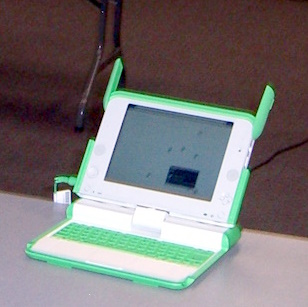
An XO / OLPC laptop An XO / OLPC laptop.

1. One (if not more) of its keys is sticking. It is, unfortunately, one of the "key" keys, heh heh. I don't even know precisely which one it is, but I think it's Ctrl, or Alt, or some such key that modifies the behavior of other keys. It malfunctioned in the worst possible way: it's acting as if it is always pressed. So when I press any other key, the computer reacts as if I issued a special command, and does something unpredictable. And no, I did not spill anything on the keyboard. The funny thing is that it does not stick all the time. When I boot the lappy, all the keys work fine for a short while, and then out of the blue the problem starts. So the laptop has become practically unusable.

But that's not all.

So far the biggest perk I got out of my XO ownership was not the computer itself, but a free subscription to T-Mobile wireless access. T-Mobile rewarded "Give 1, get 1" customers with a year of free access to its hotspots. It's been a good deal so far because all Starbucks are T-Mobile hotspots, and there is a Starbucks on every corner, so my WiFi-enabled pasture has become much bigger. And I can use the subscription with any wireless device, not just with XO. So far so good.

Guess what I've read in the news yesterday?

Starbucks to Offer Free Wi-Fi With AT&T

Starbucks Corp. and AT&T Inc. will start offering a mix of free and paid wireless Internet service in most of the global coffee retailer's U.S. shops, beginning this spring.

The move announced Monday ends a six-year Starbucks partnership with T-Mobile, which did not include free Wi-Fi and charged higher fees than AT&T will.

So my T-Mobile access is about to become worthless. I don't know of any of their hotspots outside of Starbucks (well, there is one at a Borders' bookstore, but I haven't been able to connect to it). Oh well, it's seriously time to look for a computer museum to donate my XO to (since I now believe that these laptops, far from taking the world by storm, will become, to quote a friend, "tech curios".)

It's high time for me to buy a new "real" laptop. I have a few ultra-portable candidates in mind, but I haven't seen them in stores, and I am squeamish about buying a laptop on the internet sight unseen.

By the way, the Starbucks news is not all bad:

Starbucks said it will give customers who use a Starbucks purchase card two hours of free wireless access per day.

So if I limit my Starbucks visits to 2 hours (and I rarely have the time for a longer stay), I should still be able to enjoy free WiFi. But definitely on a different laptop.

Friday, January 18, 2008

When a laptop crush burns you

I have not yet admitted it in this journal, but for the last 2 weeks I've been conducting a torrid love affair with another laptop, a Fujitsu Lifebook Q2010. In this post I identified it as my newest laptop crush. Well, our romance was tumultuous and crashed spectacularly. Such a seducer, it was! Spectacularly thin (though not anorexic like the new MacBook Air), light as a feather; small, but with a comfortably sized keyboard. I thought it would make a great companion for me everywhere I go.

Long on beauty, short on capacity

I knew this extreme portability came with some sacrifices. For example, it lacks a CD / DVD drive. This didn't matter, because I use CDs and DVDs very rarely; I keep all my data on external hard drives or flash drives. What did give me a pause was that this laptop had only 512 MB memory. That's the same amount of memory I have in my old Fujitsu laptop (the one that had mouse-ectomy performed on it), and I bought it 3.5 years ago! It gets bogged down easily when I run the minimal number of applications I need every day: Firefox, emacs, Open Office and Photoshop. So it wouldn't make much sense to buy another lappy with just as little computing power.

I blame the wingmen

Why did I buy it, then? It's not that infatuation made me blind: I blame the wingmen -- sales guys at Fry's Electronics -- for my bad decision. (Let's see how far can I stretch the analogy!) They assured me I can upgrade the memory to 2GB, and that it's very easy to do it at home. At home, S and I opened the memory compartment and peeked inside. Not only it didn't have the promised levers that let you lift the memory out and replace it with a new one, it didn't seem to have the same kind of connectors as the memory chip I bought. So I took the laptop to Fry's service department to see if they can upgrade it for me (for a price, of course). They kept it for a day, then called me and said the memory was not upgradeable: it was soldered on the motherboard!

I still didn't want to return the lappy at this point. I had already made 4 trips to Fry's within a week (the 4th one was to pick up the laptop's power supply, which I forgot the previous time) and I simply felt I have invested too much time in this laptop to write it off. So I tried to pretend I could work around this. Only I didn't get very far.

I don't click links that say "Click me!"

S set it up to access our home wireless network, but the laptop was unable to connect. I took it to a few coffeeshops with public, unencrypted access points, and it could not connect to any of them. Finally I called Fujitsu tech support from one of those coffeeshops. The tech support guy told me there's an icon on the desktop entitled "Click Me" and that I needed to click it before I could do anything else with the laptop. Clicking it will unpack a bunch of drivers and programs that are necessary for the laptop to work, he said. When I idly wondered why weren't those programs installed on the laptop to begin with, the guy replied only that Fujitsu has always done it this way. A compelling explanation if there ever was one.

I did not even see the tricky little icon at first, because I guess my brain has wired itself to tune out spammy word combinations such as "click [here|me]". Links that beg me to click them without making a compelling case why I should, are usually the kind I would never click if I knew what was behind them.

But now I had to, so I did. I got a bunch of errors. After making me repeat the operation twice, the tech support guy concluded that the operating system (Windows XP) on the laptop was corrupted, because I had not clicked the icon before doing anything else on this laptop. I asked, "so you are telling me that the operating system got corrupted because I tried to access internet without unpacking those programs?" He said yes. I said it was beyond ridiculous.

Sometimes it's best to let that one get away

But then he asked me if by any chance, the laptop I bought was a a store loaner / demo unit. Why, yes, I replied. Indeed it was a demo unit. In fact, part of why I bought it was that it was the last unit in store! They've been discontinued, and this was my last chance to buy a laptop of this kind. Nothing can inflate an item's desirability like knowing that this is your last chance to nab it! The tech support guy said, ah-ha! You never know what its previous users did to it, that might have corrupted the OS. Well, uh, maybe, but Fry's told me they wipe the lappy clean and reinstall the OS from scratch! Still, the guy said, my only recourse at this point was to reinstall Windows myself from recovery discs.

Thank you, I said. And I went back to Fry's and returned it.

So now I'm back on the market for laptops. I'll be more careful next time -- with my time and money, if not my heart.

Friday, January 11, 2008

XO networking at an Austin Linux Group meeting

After grumbling in solitude for the last few weeks, I got a chance to try XO out the way $deities intended it to be used: networked with other XOs at an Austin Linux Users Group meeting. These capabilities are supposed to make it the coolest laptop known to humankind.

In theory, at least.

Beside me, 2 people brought their XO laptops to the meeting: Mr. The Joe Barr (who gave a presentation), and a guy I shall call Mr. Emily, because that was the name of his wife's computer, and by extension, his wife. A few more people came to play with these 3 lappies.

A ghost laptop

We tried to see if the three computers could see each other. They did, to various degrees of success and with various permutations. I could see Joe's computer in my neighborhood view, but not Emily. Joe's computer could see Emily, and occasionally me. My icon popped on and off on its screen unpredictably, regardless of what I was doing. Emily could see both of us, plus a fourth XO -- a ghost computer! It was named Clatrissa. None of us had any idea who she or he was, except that she must have been somewhere in the building, or nearby. Spooky! How many other XO users does any XO user run into on an average day? And how likely are you to run into one randomly when there's already an XO meeting going on in the building? But maybe there was a more mundane explanation for the ghost XO. Could it be possible that the real Emily had networked her XO with a "Clatrissa" in the recent past, and the laptop had not been rebooted since then, so Clatrissa's icon hung around? I've experienced something similar with wireless access point icons. I may move from one location to another miles apart, but the icons of some of the wireless access points in the previous location (all of them, not just the one I had connected to) still hang around. Only rebooting the computer makes them disappear.

The owner of the laptop named Emily at the Austin Linux Group XO networking event in January 2008 The owner of the laptop named Emily at the Austin Linux Group XO networking event in January 2008.

Invitation confusion

Mr. Emily issued an "invitation" to Clatrissa, but s/he didn't respond. Probably because s/he didn't exist, but perhaps because invitations are a bit of a tricky business an XO, as we discovered. Well, at least for novices. When you move a mouse over another XO user's icon, two options pop up: Make a friend, or Issue an invitation to browse. Apparently, all Make a friend does is add the other user's icon to your Group view. It does not seem to inform your "friend" that you have friended them. Inviting someone to browse had seemingly just as little effect. I issued an invitation to browse to Joe's laptop and then went over to see if the invitation was received. No sign of that. But perhaps Joe didn't get my invitation because his laptop couldn't see mine at all? It's anybody's guess. And I did not try to orchestrate invitations between two laptops that were definitely seeing one another (such as Joe and Emily), because they were at that time both swarmed by other people who seemed to be more interested in dissecting the operating system rather than putting Sugar through its paces.

Apparently there is also a misconception that you can't see other XO users nearby if you are connected to a wireless access point, but that's not true. You can. But then I guess the ultimate test for XO networking would be for one of us to start a mesh network and for others to connect to it and get on the internet via the first person's computer. We didn't even try, since there were problems to even try to see other users. Besides, Joe wasn't sure if you don't need a school server for that. Maybe only the school server can serve as an access point for all the laptops to connect to.

Mr The Joe Barr at the Austin Linux Group XO networking event in January 2008 Mr The Joe Barr at the Austin Linux Group XO networking event in January 2008.

I also was very -- how shall I put it -- vocal about the XO deficiencies I've experienced so far. I was semi-expecting to be called a Microsoft shill for that, but actually Mr. The Joe Barr was sympathetic and said I should report my troubles to the OLPC developers -- I would be helping them out. So maybe I will, once I get around to it. While Joe said he had not experienced the same problems, I felt somehow validated that some people agreed the limitations of this laptop were real. There was some discussion as to whether the laptop's intended audience, third world schoolchildren, will perceive them as limitations. For example, inability to back up large batches of files to a USB drive is not a limitation if you, umm, don't own a USB drive. Joe thinks backups are intended to be stored on school servers. Perhaps that's a correct assumption on the designers' part, who knows. But even Joe agreed that this laptop (or at least the Sugar interface) is not intended for power users. As the schoolchildren ramp up to become power users, they may have to switch to more powerful systems. But that may come sooner than such systems become affordable in the developing countries.

Austin Linux Group secretary Paul Elliot did us all a service by asking questions on an OLPC IRC channel on our behalf. Thanks to him I found out how to import images into Paint application, and got a few other questions answered.

Monday, January 07, 2008

XO: conclusions

Update on backups. It really is possible to back up an "activity" by dragging and dropping it from the Journal to a USB drive icon at the bottom of the Journal. I did this to an activity named test1.txt, and a file by that name actually appeared on the USB drive. But, as I expected, it appeared in the top-level folder. I could not have placed it in any of the folders on the USB drive, because the XO operating system does not recognize folders. For the sake of accuracy I must say the underlying Linux system does recognize folders / directories, it's just the Journal (which is essentially a dumbed-down file manager) doesn't. But you can't copy files to the appropriate folders using command line, because you don't know the "real" file names (they are encrypted, I heard). The user-friendly file names are only visible in the Journal, but the Journal doesn't recognize folders. So whatever files you back up will only be backed up to the top level folder of an external drive. Not very useful in real life situations.

No easy way to organize your data

Absence of folders me wonder whether this laptop can be adequate for any kind of real life use, even in the lives of third world kids. Here's why I doubt it:

-- if you can't organize your files into folders, the external hard drive you store them on will be nearly useless if transferred to a non-XO computer. If you store hundreds or thousands of files in a top-level directory, the information in them becomes practically unfindable. (Yes, you can search, but only the files that have text in them. Search won't help you tell if a file named DCF2519.jpg is a vacation picture or a birthday picture, or something else, unless you store it in a folder "Vacation" or "Birthday".)

-- to back files up, you have to drag-and-drop them to an external drive icon one by one. There is no ability to select multiple files, at least not that I see. It would quickly make any kind of real-life file backup tasks very tedious; and tedious tasks usually get neglected until oops, your hard drive has crashed.

Speaking about findability of files, I realize XO interface is built around a different paradigm of data organization than the one we are used to (hierarchical system of folders). The XO Journal stores everything in a chronological stream. The "activities" in it are sorted by date. You can also search them -- there is a search bar at the top of the Journal. You can filter the view by a file type, or by "recentness", though it has very limited options for that: today, since yesterday, last week, last month, last year. You can't enter an exact date range. The "search, don't file" philosophy has a serious limitation of being applicable only to text, not binary files.

Plus, the search takes forever (or hangs) if your external drive has a realistic number of files. In my previous post I said I have thousands of files on my USB drive. To see how far I need to scale things down before XO stops choking on them, I tried another drive with only a couple hundred files, most of them text. The search still hanged.

An XO / OLPC laptop An XO / OLPC laptop.

One might point out that the Journal allows you to add tags and description to each activity. Tagging image, video and audio files would make them searchable (the search mechanism does look inside tags, I'm glad to say). But how many people are going to do that? What is easier: to mass-select a bunch of images and drag-and-drop them to a folder named "Birthday" or to paste a tag "Birthday" a 100 times next to each and every picture you took on your birthday?

A toy, not a tool

To reiterate,

1. XO does not let you organize the files in a way that's (a) scalable, and (b) preserved if transferred to a non-XO computer.

2. To whatever extent it lets you organize your files, it can only handle ridiculously small amounts of data. I suppose if I only had 10 files on my external drive, the search might work. But do you know any person who has only so few files on their drives?

So if you do no more than 3-4 activities at a time, and if you don't want to keep most of the files you generate, then I guess this laptop may be adequate. In other words, you have to be using it as a toy, not a tool, to avoid running into its limitations. But this can't be how school students are supposed to use a laptop (any laptop, not just this). Aren't students supposed to save their class notes to use them in the future, as the class material each year builds upon the previous year? If so, you would expect students to generate tons of files, most of which should be easily searchable and accessible. Also, if the laptop chokes upon large chunks of data, what's the point of giving it an ability to generate large binary files, such as video and audio? Especially if you keep in mind that a handy video camera might tempt a child to go on a wild creative spree, recording everything in sight (heck, it even makes me, an adult, do that!) What's the point of creating hundreds of binary files, if a mere attempt to view their names in the Journal crashes the Journal?

Note that I haven't even talked about the video and audio recording functionality of this laptop; I was discouraged from trying to manipulate huge binary files by seeing how XO's memory chokes on ~ 2K of text data. I'm sure the recording capabilities are neat, but to me, they are icing on the cake; the cake itself -- or rather the daily bread -- is ability to organize and access your data. If this laptop can't do that, in any real-life situation, then I'm not sure what's the point to try to do anything with it.

Saturday, January 05, 2008

XO: forget about folders. Where are my FILES?

No, dear reader, I'm not done complaining. I saved the best for last.

XO has some even more fundamental problems... sorry, weirdnesses. Sorry, design features.

If you are computer-literate person, wouldn't you feel a bit embarrassed to ask where your files are? XO makes you stoop to new lows of embarrassment. Let's say you save a file, and then open a terminal and try to find it from the command line. Well, not only I wasn't able to find them using the UNIX find command, but several Linux experts at a meeting of the Austin Linux Group were unable to find those files using find with all sorts of advanced options. Then after some googling one of them found an indication the file names on XO may be encrypted. So no matter what you call your file, you won't be able to find it.

An XO / OLPC laptop An XO / OLPC laptop.

By the way, what exactly is a file name on OLPC is not entirely clear. Nor is a mechanism by which one saves a file in the text editor. The editor has no "Save" menu option. The only thing that resembles saving a file is clicking on "Activity" tab in the text editor (or, to use XO terminology, in the Write Activity) and then you'll see a little bar in the upper left corner; by default, this bar says "Write Activity". You can change this text to anything you want, which is akin to giving file a name. Then if you switch to Journal, you'll see this activity referred to by the name you just gave it. So it is indeed like a file name. Like is the keyword here. Because nowhere on the machine you'll find a file by that name.

Can you back up your files without knowing where they are?

Well, perhaps the XO computing paradigm does not require you to know file names in order to find them again? At a first glance, yes. You can see all your "activities" in the Journal, so you don't really have to search for them by their file names. Which leads to a question: is Journal capacity infinite? Will every activity you've ever done be listed there? Or do the oldest activities "expire" after a while? Because if they do, and you can't find them by the file name, you're screwed if you ever want to access them again.

But of course Journal can't be infinite, because XO hard drive (sorry, flash drive) isn't infinite. Which brings us to the next, critical question. How do you back up your files?

When I plugged in a USB drive, I opened it in the Journal (by clicking the USB icon at the bottom of the Journal), then switched back to the Journal, and tried to drag-and-drop an item from the Journal onto the USB icon. The icon seemed to move, so I thought I'd switch back to the USB drive view and see if the file will appear there. I could not switch back to Journal (by clicking its icon at the bottom). Then I tried to unmount the USB drive (by clicking Unmount), and then unplugged it. This action crashed my Journal! It disappeared.

So now I'll have to reboot to see if the Journal is restored, and if my test file actually appears on the USB drive. What fun!